【读书活动感悟分享】极客充电队——《Head First 设计模式》第二章观察者模式读书心得

在我们开始讲解观察者模式之前,我们先看下订阅报纸的过程:
1、报社开始运营,出版报纸。
2、向特定报社订阅,每次他们有新报纸,就交付给你。只要保持订阅,你就会一直得到新报纸。
3、当你不想再看报纸时,就取消订阅,报纸就停止交付。
4、只要报社还在运营,就会一直有人订阅和取消订阅报纸。
了解报纸的订阅,就会在很大程度上理解观察者模式,只是我们把出版者叫作主题(SUBJECT), 把订阅者叫作观察者(OBSERVER)。
出版者+订阅者=观察者模式
观察者模式的定义
观察者模式定义对象之间的一对多依赖,当一个对象改变状态时,它的所有依赖者都会收到通知并自动更新。
主题和观察者定义了一对多关系。主题(SUBJECT)是有状态数据的并控制状态数据的对象,观察者(OBSERVER)依赖主题的状态数据,主题的状态数据有变化时,需要通知众多观察者。需要注意,主题是数据的唯一拥有者,观察者是主题的依赖者,在数据变化时更新,这样比起允许许多对象控制同一份数据来,可以得到更干净的OO设计。

观察者模式的实现方式
观察者模式的实现方式较为固定,分为主题接口和观察者接口,主题接口定义了3个方法,一个是观察者注册接口,一个是观察者删除接口,一个是主题用来向观察者发送通知的接口。观察者接口定义了一个接口,是主题向观察者通知数据变化的通知接口。
///
/// 主题接口
///
public interface Subject
{
    // 注册观察者
    public void RegisterObserver(Observer o);

    // 删除观察者
    public void RemoveObserver(Observer o);

    // 把状态通知所有观察者。因为他们都是Observer,我们知道它们都实现了Update方法,所以知道如何通知它们。
    public void NotifyObservers();
}
///
/// 所有的观察者都实现Observer接口
///
public interface Observer
{
    // 这些数据是变化时观察者从Subject获取到的状态值
    public void Update(float temp, float humidity, float pressure);
}
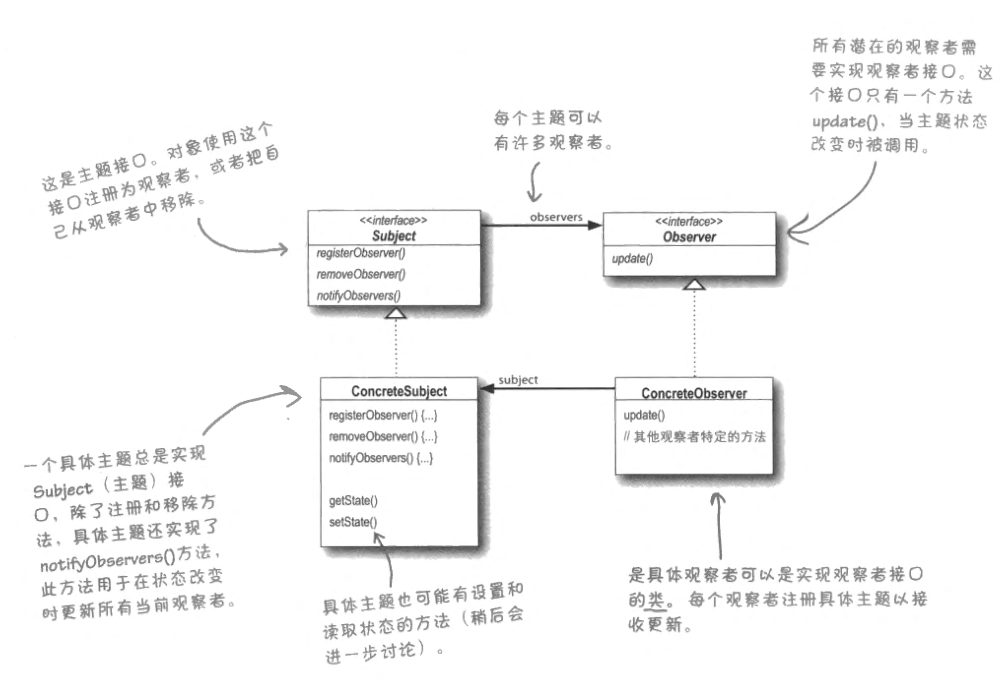
标准实现
///
/// 主题接口
///
public interface Subject
{
    ///
    /// 注册观察者
    ///
    ///
    public void RegisterObserver(Observer o);
    ///
    /// 删除观察者
    ///
    ///
    public void RemoveObserver(Observer o);
    ///
    /// 把状态通知所有观察者。因为他们都是Observer,我们知道它们都实现了Update方法,所以知道如何通知它们。
    ///
    public void NotifyObservers();
}
///
/// 所有的观察者都实现Observer接口
///
public interface Observer
{
    ///
    /// 这些数据是当气象测量数据变化时观察者从Subject获取到的状态值
    ///
    ///
    ///
    ///
    public void Update(float temp, float humidity, float pressure);
}
///
/// 显示器显示数据
///
public interface DisplayElement
{
    public void Display();
}
public class WeatherDataObserver : Subject
{
    private List observers;
    private float temp;
    private float humidity;
    private float pressure;
    public WeatherDataObserver()
    {
        observers = new List();
    }
    ///
    ///
    ///
    public void NotifyObservers()
    {
        foreach(var o in observers)
        {
            o.Update(temp, humidity, pressure);
        }
    }
    ///
    /// 当一个观察者注册时,我们只是把它添加到列表
    ///
    ///
    public void RegisterObserver(Observer o) { observers.Add(o); }
    ///
    /// 当一个观察者想取消注册时,把它从列表拿走
    ///
    ///
    public void RemoveObserver(Observer o) { observers.Remove(o); }
    ///
    /// 当从气象站得到更新的测量值时,通知Observer
    ///
    public void MeasurementsChanged() { NotifyObservers(); }
    public void SetMeasurements(float temp, float humidity, float pressure)
    {
        this.temp = temp;
        this.humidity = humidity;
        this.pressure = pressure;
        MeasurementsChanged();
    }
}
public class CurrentConditionsDisplay : Observer, DisplayElement
{
    private float temp;
    private float humidity;
    private Subject weatherDataObserver;
    public CurrentConditionsDisplay(WeatherDataObserver weatherDataObserver)
    {
        this.weatherDataObserver = weatherDataObserver;
        this.weatherDataObserver.RegisterObserver(this);
    }
    public void Update(float temp, float humidity, float pressure)
    {
        this.temp = temp;
        this.humidity = humidity;
        Display();
    }
    public void Display()
    {
        Console.WriteLine("temp:"+ temp+ "   humidity:"+ humidity);
    }
    public void UnSubscribe()
    {
        weatherDataObserver.RemoveObserver(this);
    }
}
public class ObserverDemo
{
    public static void Main()
    {
        WeatherDataObserver weatherData = new WeatherDataObserver();
        CurrentConditionsDisplay currentDisplay = new CurrentConditionsDisplay(weatherData);
        weatherData.SetMeasurements(1.0F,2.0F,3.0F);
        currentDisplay.UnSubscribe();
        weatherData.SetMeasurements(1.1F, 2.2F, 3.3F);
    }
}
委托充当订阅者接口类
// 委托充当订阅者接口类
    public delegate void NotifyEventHandler(float temp, float humidity, float pressure);
    public class WeatherDataEventer
    {
        private NotifyEventHandler observers;
        private float temp;
        private float humidity;
        private float pressure;
        ///
        ///
        ///
        public void NotifyObservers()
        {
            if (observers != null)
            {
                observers(temp, humidity, pressure);
             }
        }
        ///
        /// 当一个观察者注册时,我们只是把它添加到列表
        ///
        ///
        public void RegisterObserver(NotifyEventHandler ob) { observers += ob; }
        ///
        /// 当一个观察者想取消注册时,把它从列表拿走
        ///
        ///
        public void RemoveObserver(NotifyEventHandler ob) { observers -= ob; }
        ///
        /// 当从气象站得到更新的测量值时,通知Observer
        ///
        public void MeasurementsChanged() { NotifyObservers(); }
        public void SetMeasurements(float temp, float humidity, float pressure)
        {
            this.temp = temp;
            this.humidity = humidity;
            this.pressure = pressure;
            MeasurementsChanged();
        }
    }
    ///
    /// 显示器显示数据
    ///
    public interface DisplayElement
    {
        public void Display();
    }
    public class CurrentConditionsDisplay :  DisplayElement
    {
        private float temp;
        private float humidity;
        private WeatherDataEventer weatherDataObserver;
        public CurrentConditionsDisplay(WeatherDataEventer weatherDataObserver)
        {
            this.weatherDataObserver = weatherDataObserver;
            this.weatherDataObserver.RegisterObserver(this.Update);
        }
        public void Update(float temp, float humidity, float pressure)
        {
            this.temp = temp;
            this.humidity = humidity;
            Display();
        }
        public void Display()
        {
            Console.WriteLine("temp:" + temp + "   humidity:" + humidity);
        }
        public void UnSubscribe()
        {
            weatherDataObserver.RemoveObserver(this.Update);
        }
    }
    public class ObserverDemo
    {
        public static void Main()
        {
            WeatherDataEventer weatherData = new WeatherDataEventer();
            CurrentConditionsDisplay currentDisplay = new CurrentConditionsDisplay(weatherData);
            weatherData.SetMeasurements(1.0F, 2.0F, 3.0F);
            currentDisplay.UnSubscribe();
            weatherData.SetMeasurements(1.1F, 2.2F, 3.3F);
        }
    }
观察者模式是如何利用设计原则的?
观察者模式体现了设计原则中的松耦合概念。
什么是松耦合?
1、在软件开发中,如果对象绑在一起的紧密程度小一些,设计就不容易碎。
2、所有对象都依赖于其他对象,但—个松耦合对象不知道或在意另—个对象的太多细节。
3、当两个对象之间松耦合时,它们可以交互,但是通常对彼此所知甚少。
4、松耦合设计经常给我们带来很多弹性。
观察者模式是如何达到松耦合?
1、主题知道观察者的唯一一件事情是,它实现了某个接口(观察者接口)。
它不需要知道观察者的具体类,它做什么或者关于它的其他事情。
2、我们可以在任何时候添加新的观察者。
因为主题唯一依赖的东西是实现观察者接口的对象列表,我们可以在想要添加的时候,添加新的观察者。事实上,我们可以在运行时替换任意观察者为另一个观察者,主题不会受到影响。同样,我们可以在任何时候移除观察者。
3、要添加新的类型的观察者,我们不需要修改主题。
假如我们有个新的具体类需要当观察者,并不需要对主题的代码做任何修改来兼容新的类型;我们只需要在新类中实现观察者接口并注册为一个观察者。主题不关心这个,它会发通知给所有实现了观察者接口的对象。
4、我们可以彼此独立地复用主题或观察者。
如果我们在其他地方需要使用主题或观察者,可以轻易地复用,因为二者并非紧耦合。
5、改变主题或观察者其中一方,不会影响另一方。
因为二者是松耦合的,所以我们可以自由地改变任一方,只要对象依然满足约定,实现主题或观察者接口。
观察者模式是如何利用设计原则的?
1、识别应用中会变化的方面,并将其和不变的方面分离。
在观察者模式中,改变的是主题的状态,以及观察者的数目和类型。有了这个模式,你可以改变依赖于主题状态的对象,却不必改变主题。
2、针对接口编程,而不是针对实现。
主题与观察者都使用接口。主题跟踪实现观察者接口的对象,而观察者通过主题接口注册并被通知。
3、优先使用组合而不是继承。
观察者模式使用”组合”来将任意数目的观察者组合进主题。这些关系不是由某种继承层次设置,是在运行时通过组合设置的。